
Getting Started
Getting started is easy.
Install the app, open it. It will ask you for permission to see your location and grab your motion data from the phone. Those two are necessary for Huginn to work. See the privacy policy for more.
A day, logged
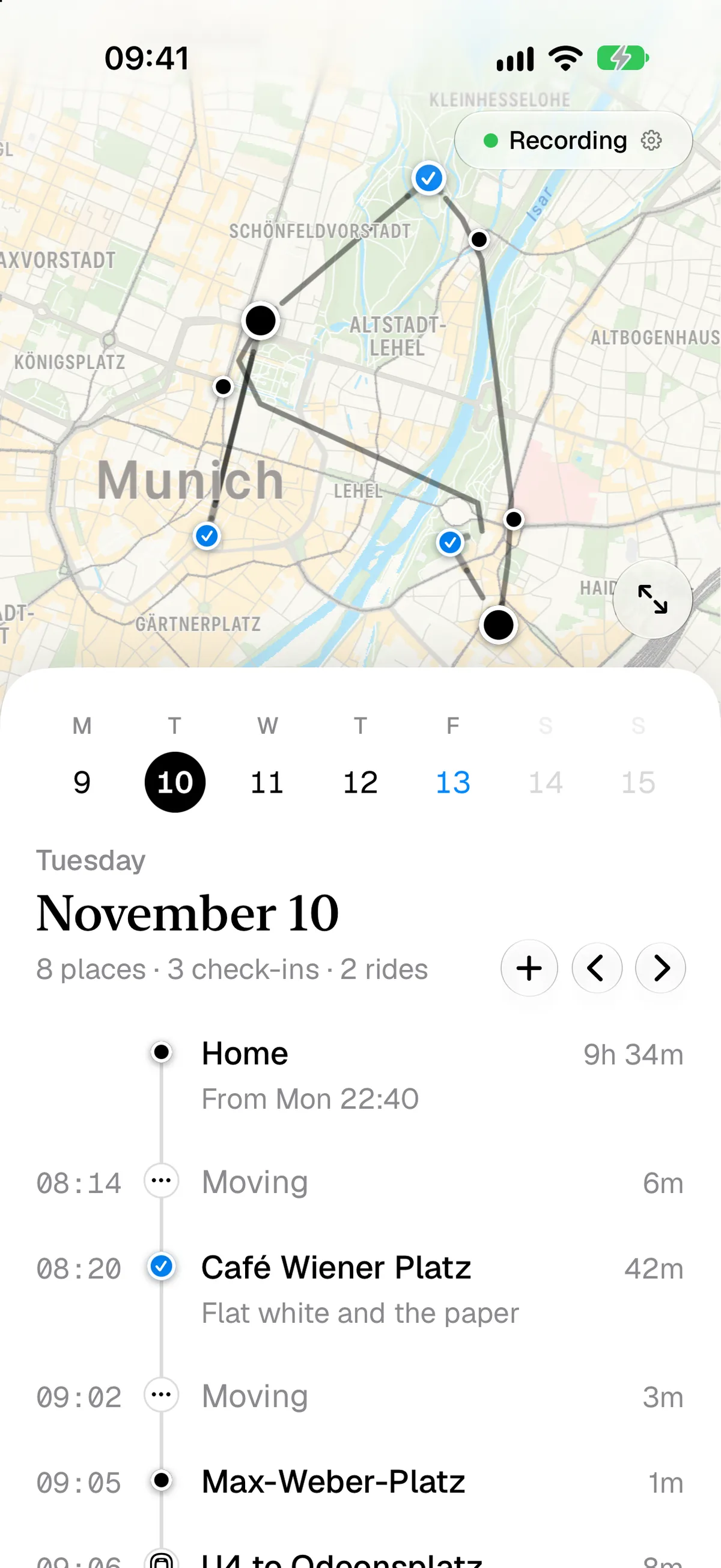
As you go about your day, Huginn quietly sits in the background and waits. Only if you leave a place and move to another it wakes, to see where you went and how you got there. That’s basically it, no big deal.
Huginn does two things: find out where you are, find out how you got there, and then makes a decision how to name both things. Sometimes it has help, from you mostly, in those areas: you did this trip before or named that place, then it’ll show that. In the screenshop that’s “Home” - naming your home “Home” makes sense :).
In this screenshot, Huginn didn’t know how you moved. It just shows “Moving” - tap the word, and select how you moved - bus, subway, walking, biking, car… you name it, Huginn learns it. And over time, Huginn gets smarter and makes less mistakes or is less confused.
Café Wiener Platz has a blue check mark. That means, you “checked in” to the café - you arrived, Huginn popped up a notification saying “Are you at Café Wiener Platz?”, you said “Yes” (or corrected it, if Huginn got it wrong), and that’s now a “we’re certain, and this was significant” message to Huginn.
Corrections
Anything that is recorded can be corrected by tapping it. A stay can be split (if Huginn didn’t realize you walked 20 meters to the next store) or merged, a movement too. Huginn tries to guess when that split happened, but you can correct it.
Outside Help
Connect Träwelling if you live in Europe and take the train a lot. It’s simple, private, and we never tell Träwelling where you are, we just ask it to give us back the data you already gave it.
If you fly, Huginn sees two things: you’re at an airport, then suddenly the GPS goes dark, and a while later, when it comes back, you’re thousands of miles away from where you were: that has to be a flight. We use data from OurAirports locally, no network lookup needed.